Let the Yard Know When You’re Out Hacking
Who’s out, at a glance
When you record a hack in Equessa, you can now put it on your yard board. The board shows:
- Out hacking: who’s out, on which horse, the route they picked, and when they’re due back;
- Recent hacks: the rides shared to the board in the last week, with the route, distance, time and gaits;
- Yard routes: the routes people at the yard ride, with the latest note on each, such as “Ford’s deep after the rain. Go round by the lane.”
On the yard screen in the feed room, hacks have a page of their own. While someone’s out, a strip along the bottom of every page says who, and when they’re due back.
Watch how it works:
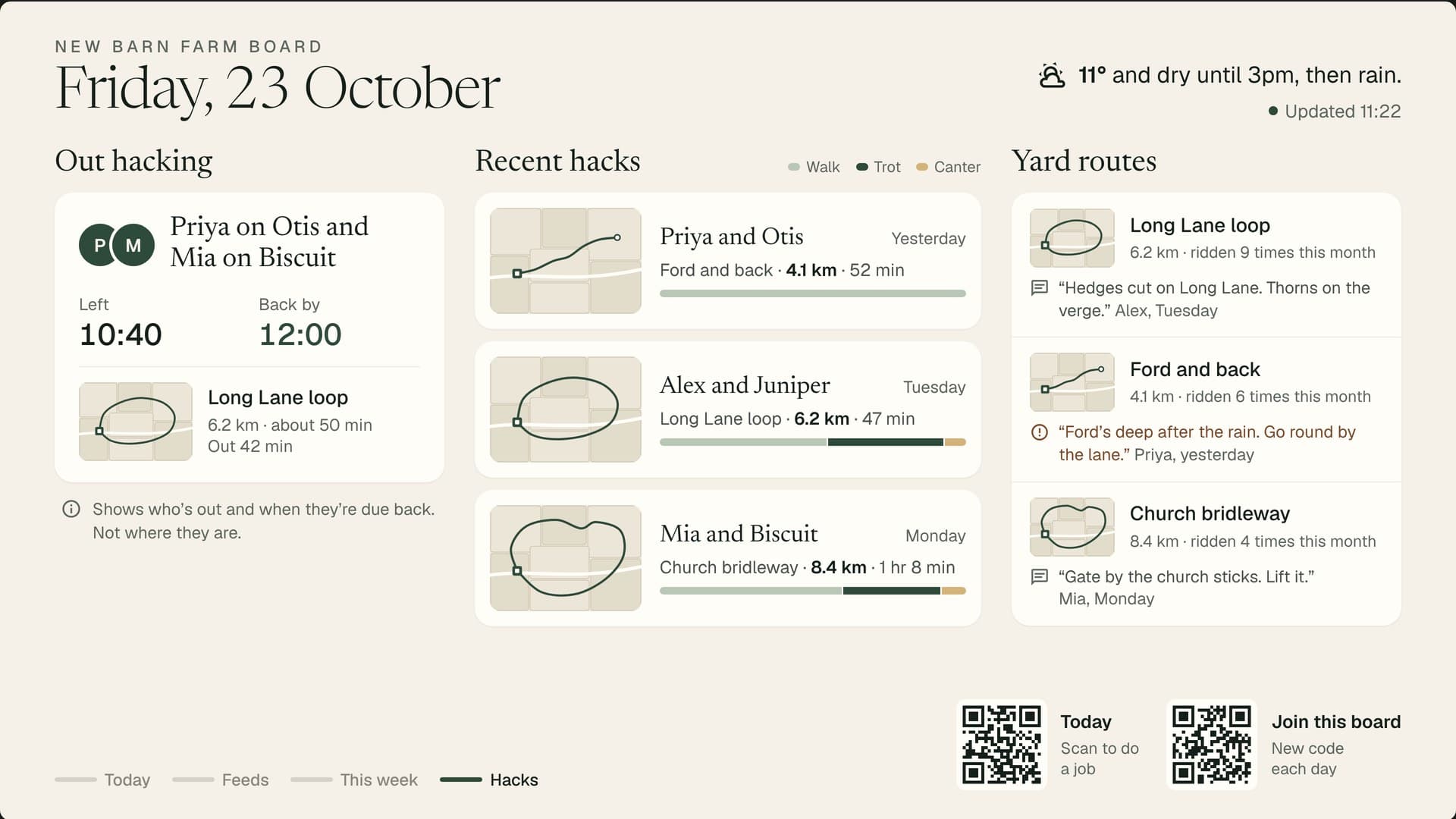
The board never shows where you are. It shows when you left, the route you picked and when you’ll be back. Nothing else.
Before you ride
- Start a hack. In the Equessa app, tap the + button and choose Record a hack.
- Pick your route. Tap one of the yard’s routes, such as Long Lane loop, or Somewhere new.
- Turn on Show me as out hacking. Under your yard board’s name, turn on Show me as out hacking.
- Set your back-by time. Use − and + to set when you expect to be back.
- Tap Start hack.
You’re on the board straight away, and you come off it when you finish the hack. Equessa remembers your choice for next time, so you only need to set it once.
After the ride
When you finish, you’ll see your route, distance, time and gaits.
- Choose whether to share it. Leave Share to the board on to add the ride to Recent hacks for a week, or turn it off to keep it to yourself. Equessa asks each time, starting with what you chose last.
- Save a new route (optional). If you rode Somewhere new, turn on Save as a yard route and give it a name, so everyone can pick it before a hack.
- Leave a note for the next rider (optional). Gates, mud, hedge cutting: anything the next person on that route should know. It goes on the route under Yard routes. For something people really need to know, such as a fallen tree, tick Mark it as a warning: it shows in leather (brown) for two weeks.
- Tap Save to [your horse]’s record.
If you’re running late
If you’re 10 minutes past your back-by time, the strip on the yard screen and your card under Out hacking turn leather (brown), so the yard can see you’re late back. It clears when you finish the hack.
Equessa doesn’t call or message anyone, and it doesn’t share your location. If you’re going to be late, let someone at the yard know.
Questions
Can people see where I am? No. The board shows the time you left, your route and your back-by time. It never shows your position.
Do I have to share every ride? No. You choose each time you save a hack. Turning off Show me as out hacking keeps you off Out hacking too.
Who can see my hacks? Everyone on your yard board, in the app and on the yard screen. Shared rides stay in Recent hacks for a week. The hack itself is saved to your horse’s record, which the people who share your horse can see.
Can I remove a note or a route? Yes. Whoever left a note, or an admin of the board, can take it down. Whoever made a route, or an admin, can rename or remove it.